How do I link a QR code to a memorial page? Privacy, setup and family sharing
A practical UK English guide for Australian, UK and US families on linking a QR code to a memorial page, with privacy, setup, cemetery and sharing checks.
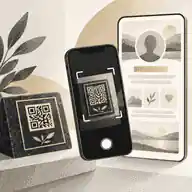
How do I link a QR code to a memorial page? Privacy, setup and family sharing starts with one simple principle: the QR code should point to a stable, family-controlled memorial page, while the family decides what visitors can see, who can contribute and how the page will be maintained over time. To link a QR code to a memorial page, create or prepare the memorial page first, copy its final public or private sharing link, generate a QR code from that link, test the scan on several phones, then place the code on a plaque, order of service, funeral notice or headstone only after the family and cemetery have approved the privacy, setup and sharing plan.
A QR code is not the memorial itself. It is a scannable doorway to the page. The underlying technology is well established: DENSO WAVE explains the history of the QR Code, including its development in 1994 as a two-dimensional code designed for fast reading. In a memorial setting, that means a small square pattern can open a life story, photographs, videos, voice recordings, service details, condolence messages and later updates without trying to engrave all of that onto stone.
The best process is usually page first, code second, plaque last. Families who begin with creating an online memorial step by step can check names, dates, relationships, photographs and permissions before anyone scans the code. That order also prevents one of the most common mistakes: printing or fixing a QR code before the destination is ready, private enough, accurate enough and likely to remain available.
link a qr code to a memorial page: practical guidance
A memorial QR code should link to the canonical memorial page, not to a temporary draft, a social media post, a private file-storage folder or a payment page. The destination should be readable on a phone, load quickly, explain who the person was, and make the next action obvious: read, remember, leave a tribute, view service details or contact the organiser if appropriate. Families deciding what a QR memorial can realistically link to should think beyond a biography and include only content that serves visitors respectfully.
At a minimum, the linked page usually needs a full name, preferred name, photograph, birth and death years if the family wants them shown, a short life story, and a clear tribute area. A richer page may include a timeline, selected music, video, voice clips, funeral livestream details, donation preferences, family updates and a moderated guestbook. The code can also sit beside other forms of remembrance: a simple inscription still gives the essential facts, while the memorial page carries the fuller story.
For example, a visitor who scans a QR code at a gravesite might open a page that explains the work and imagination of Steve Jobs, a public figure whose story is more expansive than a stone inscription could ever hold. Another memorial might use the same structure to preserve public service, family photographs and messages of care around Princess Diana. For Australian families, a profile such as Olivia Newton-John also shows how a memorial page can hold a life across countries, careers, family memories and causes.
Privacy should be decided before the QR code is shared
Because a physical QR code can be scanned by anyone who can see it, privacy cannot be treated as an afterthought. The most important question is not whether the QR code works; it is what the scan reveals. A family may want a public page that any graveside visitor can open, a private page only invited people can view, or a hybrid arrangement where basic information is public and intimate photographs or contributions are limited.
The UK, Australia and the United States treat privacy differently, especially where information about deceased and living people appears together. The UK Information Commissioner's Office explains that UK GDPR personal data relates to identifiable living people, while information about deceased people is outside that definition. In Australia, the OAIC similarly notes that personal information in Australia generally does not include a deceased person, but information about living relatives can still be personal information. In the United States, health information can remain sensitive after death; HHS says HIPAA protections for deceased individuals generally apply to protected health information for 50 years after death.
Those legal differences do not mean families should publish everything simply because some rules may not apply to a deceased person. A memorial page often includes living people: children in photographs, addresses in service details, family relationships, donor names, medical references, grief messages and contact information. Treat those details carefully. If the death involved children, family conflict, crime, domestic abuse, suicide, adoption, estrangement or sensitive medical history, begin privately and invite only trusted people until the family agrees what belongs in public.
Families comparing QR memorial safety should also distinguish privacy from security. Privacy is about who should see the memorial content. Security is about whether the QR code and page can be trusted. The FTC warns that scammers can hide harmful links in QR codes, and the Australian Cyber Security Centre describes quishing attacks where QR codes are used for phishing. For memorials, the practical answer is to use a trusted destination, avoid unexpected payment prompts, check the displayed URL before opening it, and replace any plaque that appears tampered with.
Public, private and hybrid QR memorial choices
Public QR memorials suit people with a wide community: teachers, artists, volunteers, faith leaders, business owners, veterans, sportspeople or anyone whose friends and relatives may not all know each other. A public page can help someone who visits a grave years later understand the person behind the name. It may also help distant relatives find the tribute when the family wants public discoverability.
Private QR memorials suit families who want the physical code to exist but do not want unrestricted access to the full memorial. That may sound contradictory, but it can work if the QR code opens a limited landing page, a password screen, or a page that gives only basic details while keeping private albums and contributions behind invitation settings. The decision between private versus public QR memorials should be made around the family's needs, not around what a provider happens to make easiest.
A hybrid model is often strongest. The public view can include a name, dates, short tribute, main photograph and a message that contributions are moderated. Trusted relatives can be invited to add photographs, voice clips, stories or videos. Sensitive details stay private. The memorial remains useful to visitors while giving the family control over the deepest material.
Step-by-step setup
Step one is to prepare the memorial page. Gather the correct name, spelling, dates, family-approved photograph, short story, and any service information that has been confirmed. If the page will include images of children, people who are vulnerable, or relatives who may not want to be public, review them carefully. The eSafety Commissioner offers broader platform and safety information through the eSafety Guide, which is a useful prompt to think about photo sharing, accounts and online visibility before publishing.
Step two is to choose the initial access setting. If the family is unsure, start private. You can invite reviewers, correct errors and open the page later. Step three is to decide who controls the page. One organiser should hold final responsibility, but a second trusted admin is sensible so the memorial is not dependent on one login. Step four is to decide how contributions will work: open condolences, invited contributors only, or moderated submissions from visitors.
Step five is to create the QR code from the final memorial URL. Use the exact sharing link you want visitors to reach. Avoid link shorteners unless you understand who controls them and whether they can expire. Step six is to test the QR code before it appears anywhere permanent. Scan it on an iPhone and an Android phone, on mobile data and Wi-Fi, from different distances, in bright and dull light, and with someone who did not build the page. If the page is private, test the experience as a visitor, not only as the admin.
Step seven is to place the code in the right setting. A funeral programme or notice can use a temporary printed QR code more freely than a cemetery plaque. A headstone, bench or columbarium niche needs a stronger approval process. Families should check cemetery rules for QR codes before ordering anything permanent, because the rules can change by cemetery, section, monument type, material, faith tradition and local authority.
Headstones, plaques and placement
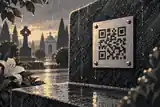
When the QR code is going onto a headstone or plaque, visual restraint matters. The code should be large enough to scan, but not so large that it dominates the memorial. It should have enough contrast, quiet space around it, and a surface that avoids glare. A polished plaque may look elegant indoors but be difficult to scan outdoors in low winter sun or heavy reflection.
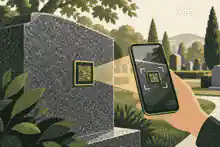
Placement should protect dignity, scanning and maintenance. Families thinking about where to place a QR code on a headstone should consider the lower corner of a plaque, a separate approved medallion, a memorial bench plate, a cremation niche, an urn or a keepsake at home. If mobile signal is poor at the grave, the QR code may still be worthwhile, but the family should also share the memorial link directly by message or email.
Rules differ by market. In the United Kingdom, cemetery and churchyard rules can be especially specific about inscriptions, material, finish and additions. The CMA's funeral directors and crematorium operators guidance is not a cemetery plaque rulebook, but it does show the wider UK emphasis on clear, standardised funeral information. In Australia, the ACCC reminds families that funeral products and services are covered by consumer law and should not be misleading. In the United States, the FTC's Funeral Rule gives consumers rights around itemised funeral goods and services, though cemetery rules still vary locally.
Family sharing and moderation
A memorial page becomes richer when family and friends can add what one organiser could never know alone. Invite relatives by role, not just by closeness. One person may have early photographs. Another may know service details. A friend may remember work stories. A grandchild may hold recent voice notes or videos. Evaheld Memorials explains how to invite family and friends to help build the memorial, and the principle applies to any careful memorial: share the work without surrendering stewardship.
Moderation should be explained before invitations go out. Tell contributors whether their memories will appear immediately or be reviewed first. Ask for specific contributions: one photograph, one short story, one song, one voice memory, or one correction. That makes the page easier to manage and reduces the emotional burden on the organiser. It also prevents a QR-linked memorial from becoming an unmanaged noticeboard.
Family sharing also needs timing. In the first days after a death, people may be trying to register the death, arrange the funeral, notify organisations and support each other. GOV.UK sets out UK steps for what to do after someone dies, including registration and government notifications. The memorial page can help with communication, but it should not pressure grieving people to perform remembrance before they are ready.
Keeping the link useful over time
The printed QR code may last longer than the web page unless the family chooses carefully. The physical code can remain scannable, yet the destination may fail if hosting ends, a subscription lapses, a provider closes, a domain changes or an account is lost. That is why families should ask about exports, backups, admin succession and whether the QR destination can be updated without replacing the plaque.
Good QR memorial planning includes updating QR memorial content over time. Families may add the eulogy after the service, correct a date, include anniversary messages, add photographs found later, or change privacy settings as grief settles. If the QR code points to a stable memorial page rather than a fixed file, the family can update the content without changing the code.
Long-term care also means keeping a family copy. Download photographs, written tributes, voice recordings and video files where possible. Keep the memorial URL, admin email, account recovery information, plaque order details and any cemetery approval in a shared family record. Guidance on downloading memorial content is useful because no digital platform should be the only copy of the family's memories.
Families asking how long QR memorials usually last should separate three lifespans: the material plaque, the QR pattern and the online destination. Outdoor materials must resist weather, cleaning and UV. The code must remain readable. The online page must remain hosted, editable and recoverable. The strongest plan addresses all three.
Common mistakes to avoid
The first mistake is linking the QR code to the wrong kind of destination. Avoid temporary folders, social media posts that require an account, private cloud links that expire, unmoderated comment pages, payment pages or URLs controlled by someone outside the family. The second mistake is publishing too much. A memorial does not need home addresses, private medical details, exact travel plans, children's school information, financial details or family conflict.
The third mistake is skipping cemetery approval. A QR plaque may be small, but cemeteries often treat any addition to a grave or monument as an alteration. The fourth mistake is relying on one administrator. A memorial can become inaccessible if one email account closes or one person can no longer manage it. The fifth mistake is making the code visually intrusive. The best QR plaques feel like part of the memorial, not a sticker added after the fact.
The sixth mistake is assuming everyone wants the same privacy level. Some relatives may want a public tribute; others may feel exposed by it. Start with the least risky setting, gather the core memories, then widen access when there is agreement. SAMHSA's discussion of coping with bereavement and grief is a helpful reminder that grief is personal, shaped by relationship, culture, circumstances and support. Memorial setup should leave room for that difference.
A practical checklist before publishing the QR code
Confirm the memorial page is complete enough for visitors. Check the main facts, spelling and dates. Decide whether the page is public, private or hybrid. Confirm who can view, contribute and approve submissions. Remove sensitive living-person information unless consent is clear. Test the QR code on multiple phones. Check the page loads on mobile data. Ask the cemetery, crematorium, churchyard, council, park or venue for written permission before attaching anything permanent. Keep an export or backup of important content. Record who controls the page and who can take over later.
Once those checks are done, the QR code can be shared with more confidence. It can appear on a funeral order of service, printed notice, thank-you card, memorial table sign, plaque proof, headstone approval packet, cremation urn, bench marker or keepsake. If the family wants a calm place to begin, Evaheld Memorials can help them link a qr code to a memorial page while keeping the person's story, privacy and family sharing decisions together.

FAQs
How do I link a QR code to a memorial page? Privacy, setup and family sharing
Create the memorial page first, set privacy, copy the final sharing link, generate the QR code from that link, test it on several phones, then use the code only after the family agrees what visitors can see. A careful setup starts with creating an online memorial step by step, while the history of the QR Code explains why the code itself is simply a fast doorway to online information.
Can I use a QR code before the memorial page is finished?
It is better to wait until the core page is accurate, mobile-friendly and set to the right privacy level, because printed or installed QR codes can be hard to change later. Decide what a QR memorial can realistically link to before sharing the scan, and follow the FTC advice to inspect QR destinations because scammers can hide harmful links in QR codes.
Is a QR memorial safe for families?
A QR memorial can be safe when the link goes to a trusted page, the family controls the content, visitors are not asked for unnecessary information and the plaque is checked for tampering. Families comparing QR memorial safety should also understand quishing attacks, where criminals use QR codes to disguise phishing links.
Can a QR memorial be private?
Yes, the physical code may be visible while the linked content remains private, limited or password-protected, depending on the memorial platform and plan. A good decision starts with private versus public QR memorials, and UK readers should note that UK GDPR personal data protects identifiable living people, so living relatives' details still need care.
Do cemeteries allow QR codes on headstones?
Some do, some do not, and many require written approval before any plaque, medallion or alteration is installed. Before ordering, check cemetery rules for QR codes and remember that the ACCC says funeral products and services should be presented clearly and not in a misleading way.
Where should the QR code be placed?
Place it where it is discreet, scan-ready, weather-resistant and approved, such as a lower plaque corner, a separate medallion, a bench plate, a niche marker or a keepsake. Families considering where to place a QR code on a headstone should also note the CMA's funeral directors and crematorium operators guidance, which reflects the UK emphasis on clear funeral information and consumer comparison.
Can the memorial content be updated after the QR plaque is installed?
Usually yes, if the QR code points to an editable memorial page rather than a static file or locked destination. Planning for updating QR memorial content over time helps families add later photographs, eulogies and corrections, while the eSafety Guide is a useful prompt to review online sharing settings as content changes.
How long will a QR memorial last?
A QR memorial lasts as long as the plaque remains scannable and the linked page remains hosted, maintained and recoverable by the family. Families asking how long QR memorials usually last should also keep practical records, and GOV.UK's what to do after someone dies guidance shows why memorial tasks often sit beside wider administration after a death.
How can family members contribute without losing control of the page?
Invite trusted people with clear roles, ask for specific memories or photographs, and review submissions before they appear publicly. Evaheld explains how to invite family and friends to help build the memorial, while the OAIC's explanation of personal information in Australia is a reminder to protect living people's details in shared family content.
Should we keep a backup of the QR-linked memorial?
Yes, families should keep copies of photographs, tributes, videos, voice recordings, the memorial URL, admin access details and plaque approvals in a safe family record. Guidance on downloading memorial content supports that habit, and HHS guidance on HIPAA protections for deceased individuals shows why sensitive health-related details should be handled carefully even after death.