Can you record a Zoom funeral? Planning, etiquette and remote guests
A practical, privacy-aware guide to recording a Zoom funeral, supporting remote guests and preserving the service respectfully across Australia, the UK and the US.
Can you record a Zoom funeral? Planning, etiquette and remote guests starts with a clear yes, provided the family, celebrant, funeral director or venue agrees, guests are told in advance, and the recording is handled with privacy and care. To record a zoom funeral well, treat the video as part of the funeral plan rather than a last-minute technical extra: choose who controls it, what will be filmed, who may receive the link, and how long the file should remain available.
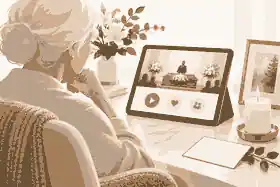
A recorded funeral can help people who are overseas, unwell, caring for children, on shift work, living with disability or unable to travel. It can also support relatives in Australia, the United Kingdom and the United States who are separated by time zones or sudden travel costs. The purpose is not to turn a private farewell into a broadcast. The purpose is to let absent mourners witness the service, hear the words spoken, and later return to the recording when they are ready. Families already planning a livestream should use a practical funeral livestream checklist before they decide whether the recording should be saved, edited, shared or deleted.
The most important rule is consent. A funeral contains private grief, identifiable guests, religious or cultural ritual, music, readings, personal stories and sometimes children. Zoom’s own instructions explain how hosts can make a meeting recording, manage local or cloud recording, and control recording permissions through Zoom meeting recording controls. Those controls are useful, but they do not replace family judgement, venue permission or local privacy expectations. The host should announce that the service is being recorded, include the same notice in the invitation, and provide a non-recorded way to share condolences for anyone who does not wish to appear on camera.
record a zoom funeral: practical guidance
Recording is usually appropriate when the immediate family wants it, the person leading the service agrees, and remote guests need a reliable way to take part. It may be especially helpful when a funeral is arranged quickly, when flights are impossible, when some mourners are in hospital or residential care, or when time zones make live attendance unrealistic. A recording can also help family members who are too distressed to absorb every reading, eulogy or tribute during the service itself.
Recording may be inappropriate when the family is divided, the venue prohibits it, the ceremony includes sacred or culturally restricted material, or the service includes children or vulnerable adults who have not been considered. In those cases, a watch-only livestream without recording, a private audio recording of selected readings, or a written memorial summary may be better. Families thinking through online attendance should also consider virtual funeral etiquette and compassionate hosting, because the emotional experience matters as much as the software.
There is a practical distinction between recording a funeral, livestreaming a funeral and creating a lasting memorial. A livestream is about real-time access. A recording is a replayable file. A memorial page can hold selected service details, photographs, tributes, the recording link and later memories in one place. If the family wants remote guests to have one calm location for the time, link, dress expectations, reception details and later updates, funeral details and livestream options can sit alongside the remembrance content rather than being scattered across messages.
Permissions, privacy and the law across Australia, the UK and the US
Privacy law differs, but the common practical standard is similar: tell people what is happening, limit access, avoid unnecessary personal information, and respect objections. In Australia, the Office of the Australian Information Commissioner explains that photos and videos can raise privacy issues when people are identifiable, especially where information is shared online; its guidance on photos and videos under Australian privacy principles is a useful reminder that the audience for a recording should be deliberate, not accidental. The same office also warns people to think before posting images or clips publicly through its advice on posting photos and videos online.
In the United Kingdom, families also need to be careful not to confuse registration and funeral administration with livestreaming. The official UK government guidance on how to register a death explains the legal registration step, while Tell Us Once covers notifying many government organisations after a death. These tasks are separate from recording a service, but they show why families should assign responsibilities clearly: one person may handle paperwork, another may liaise with the funeral director, and another may manage the Zoom recording and remote guests.
In the United States, rules can vary by state, venue contract and funeral home policy. Federal guidance on what to do when someone dies is broad, but USAGov’s after-death guidance is a useful starting point for official tasks. For recording, families should ask the funeral home, cemetery, crematorium, house of worship or celebrant whether video is permitted and whether the venue has its own streaming equipment. If music is included, avoid assuming that a private Zoom recording automatically gives permission to publish the clip later. A small private family replay is different from uploading the whole service to a public platform.
Privacy also includes platform settings. Zoom’s guidance on waiting rooms and passcodes helps hosts admit invited mourners and reduce disruption. Zoom’s broader security and privacy information explains its security approach, but families still need to make human choices: do not post the meeting link publicly unless the service is intended to be open; do not let every guest record locally; and decide who can download, forward or replay the file.
For many families, the safest setting is a private or unlisted link shared only with named guests. YouTube’s support information on video privacy settings explains the difference between public, private and unlisted visibility, and its page on live streaming on YouTube helps families understand why a replay link may need separate controls. Even when a funeral is not streamed on YouTube, the same principle applies: decide whether the recording is private family material, a semi-private link for mourners, or a public tribute.
Who should manage the recording?
One person should own the technical run sheet. Ideally, that person is not the closest bereaved spouse, parent, child or sibling. They should have the Zoom host login, venue Wi-Fi details, backup device, charger, tripod, microphone plan, phone number for the funeral director, and authority to make quick decisions. A second person should be available as backup if the host’s internet fails or the main device freezes.
The host’s job is not simply pressing record. They admit remote guests, mute microphones, spotlight the speaker if appropriate, monitor chat, check audio, start and stop the recording, save the file, and protect the link afterwards. If the family wants the recording only to include the service, the host should stop before private conversations, burial proceedings, wake discussions or travel arrangements are captured. If the ceremony includes a eulogy, slideshow or live music, test those inputs before the day.
A funeral director or professional livestream provider may be worth using when the venue is large, the service is important to many distant guests, or the family wants a polished result without asking a mourner to manage it. Professional help is also useful when there are multiple cameras, an organ or choir, a graveside segment, or a hybrid ceremony where in-person and remote speakers both need to be heard. A do-it-yourself setup can still work well for a small service, especially if the camera is stable, the microphone is close to the speakers, and the host rehearses.
A practical setup for recording a Zoom funeral
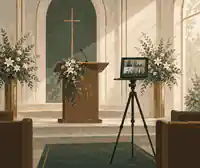
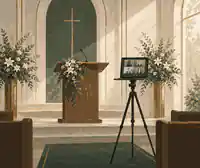
Use the simplest reliable setup that captures clear audio. A laptop on a tripod or stable table can work for a small chapel or home memorial, but a phone or tablet may be easier to position discreetly. The camera should show the lectern, celebrant or main speaking area rather than the faces of guests. Avoid filming the coffin or casket closely unless the family has specifically chosen that framing. If there is a slideshow, decide whether remote guests will see it via screen share, camera view or a later memorial upload.
Audio matters more than picture quality. A remote mourner can tolerate a slightly distant image, but they cannot follow a service if the eulogy is muffled. If possible, connect to the venue’s audio feed or use an external microphone near the lectern. If that is not possible, place the device closer to the speaker than to the audience. Test with someone walking to the lectern, speaking softly, reading a poem and playing music. Ask a remote helper to join the rehearsal and tell you what they can hear.
Network reliability is the next priority. Use venue Wi-Fi only after testing it from the exact filming position. If the signal is weak, use a mobile hotspot, wired connection or professional venue stream. Keep the device plugged in. Turn off notifications. Disable automatic updates. Close unnecessary apps. If you use cloud recording, confirm that your Zoom account supports it and that storage limits will not interrupt the file. If you use local recording, check available disk space and know where the file will save.
For families who want the recording to become part of a memorial rather than a loose file, decide what should be preserved. A full service recording can sit beside selected photographs, the obituary, a written eulogy, voice notes, condolences and later stories. If the recording includes music or private remarks, the memorial can use a shorter edited clip or a private family-only link. That decision belongs to the family, not the software.
Planning remote guests before the day
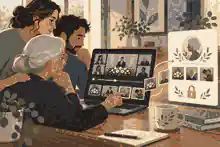
Remote guests need more than a Zoom link. Send the service date, start time, time zone, expected length, link, passcode, contact person, whether the service will be recorded, whether cameras should be on, whether microphones will stay muted, and how guests can leave messages afterwards. Include the person’s full name so no one confuses the invitation with a generic meeting notice.
Time zones matter. A 10 a.m. funeral in Sydney is not convenient for London or New York. If some guests cannot attend live, tell them when the recording is likely to be available. Do not promise immediate access if the host will need time to save, upload, review and share the file. If the family is unsure whether they want the replay distributed, say that clearly: “The service may be recorded for immediate family, and we will decide later whether to share it more widely.”
Remote guests should be told how to participate. Some services are watch-only, which is calmer and easier to manage. Others allow a remote reading, tribute or prayer. If someone is speaking remotely, rehearse with them beforehand, confirm their display name, ask them to use headphones if possible, and have a printed backup of their words in case their connection fails. If the family wants remote condolences, a memorial guestbook is often more respectful than an open chat running beside the ceremony, and how memorial pages can hold messages from others gives families a calmer way to gather those thoughts.
Etiquette for recording and replaying the service
Etiquette begins with disclosure. The host or celebrant can say at the start: “This service is being recorded for family and friends who could not be with us today. Please keep cameras off if you do not wish to appear, and know that the family will manage the recording privately.” The wording should be simple, not legalistic. Guests should not be surprised later to learn that they were recorded.
Keep the camera still. Avoid panning across mourners, filming private grief, zooming in on tears, or capturing children unnecessarily. If the service includes a condolence line, communion, ritual washing, open casket viewing or culturally sensitive moment, consider stopping the recording or reframing the camera. If a speaker asks not to be recorded, respect that request where possible. If a reading is too personal for wider sharing, record the service for private family review only or remove that segment before distribution.
Chat etiquette should also be planned. Chat can comfort remote guests, but it can distract from the service if people post continuously during prayers, eulogies or silence. A host can disable chat, allow direct messages to the host only, or invite guests to leave tributes afterwards. Families who expect many written messages may want how to moderate online memorial comments so the family can review contributions before they appear publicly.
What to do with the recording after the funeral
Before sharing the recording, review it. Check that the service recorded properly, that private conversations were not captured at the start or end, and that any sensitive moment is handled as the family intended. Rename the file respectfully. Store an original backup in a secure place. If the file is large, do not send it as an email attachment. Use a private link with restricted access and a clear note asking recipients not to repost without family permission.
Think about how long the replay should remain available. Some families want access for a few weeks; others want it preserved for years. There is no single correct answer. A spouse may want to watch privately on the anniversary; a grandchild may value it later; another relative may find it too painful. If the recording becomes part of an online memorial, set the privacy level intentionally and revisit it after the first few weeks. The family can also preserve selected media through adding videos and music thoughtfully rather than making every part of the day permanently visible.
Backups matter because platforms change, links expire and files are misplaced. Save the recording in at least two places, such as a family cloud account and an external drive. Keep a note of who owns the account, who has permission, and what should happen if that person can no longer manage it. Families who want a copy outside any single platform should consider downloading memorial content as part of their preservation plan.
How recording fits with online memorials, Zoom memorials and livestreams
Zoom memorials and funeral livestreams are often about access; online memorials are about continuity. A funeral recording captures the formal farewell, but it does not capture every memory, photograph, voice note, recipe, joke, work story or quiet act of kindness that shaped the person’s life. A memorial can keep the service recording beside those later contributions, so remote guests are not only passive viewers but part of an ongoing remembrance.
This is where brand separation matters. Evaheld Memorials is the memorial platform for online memorial pages, tributes, funeral details, guest contributions and remembrance. Digital legacy vault language belongs to Evaheld, not Evaheld Memorials. In this article, the focus is funeral recording, memorial sharing and remote guest remembrance, not estate planning or a legacy vault. Families who need collaborative contributions can use inviting family members to help build the memorial so trusted relatives can add photos, stories and details without placing all responsibility on one bereaved person.
Not every memorial should be public. Some families prefer a private replay link for a small group, while others make a public memorial page with carefully chosen service details and written tributes. The difference matters for search visibility, consent and emotional safety. A family deciding whether the Zoom funeral recording belongs behind a private link or on a wider memorial should weigh private versus public online memorials before sharing anything widely.
People often understand this balance by thinking about public remembrance. A widely admired performer such as Alan Rickman may be remembered through public tributes, but a private family service still deserves boundaries. The same is true for public figures with international admirers, such as Freddie Mercury, whose artistic legacy is public while personal grief remains intimate. For an Australian audience, Olivia Newton-John is a reminder that public affection and family privacy can coexist when remembrance is handled thoughtfully.
Common mistakes to avoid
The first mistake is starting the recording too early and capturing private preparation, technical checks or family conversations. Start when the service begins, or trim the file before sharing. The second mistake is forgetting to record at all because the host is busy admitting guests. Use a written run sheet with “start recording” in large type. The third mistake is relying only on built-in laptop audio in a large chapel. Test sound from the back of the room and from a remote device.
The fourth mistake is sharing the recording too widely. A funeral recording is not the same as a public tribute video. Ask before posting clips on social media, especially if children, grieving relatives, cultural rituals or sensitive stories appear. The fifth mistake is failing to tell guests what to expect. Remote mourners should know whether they will be seen, heard, muted, recorded, or invited to speak. The sixth mistake is treating the recording as the whole memorial. A service video can be powerful, but written tributes, photographs and condolences often help remote guests participate more gently over time. Evaheld Memorials families can preserve that wider participation through how tributes and condolences are handled.
The seventh mistake is ignoring accessibility. Some remote guests may have hearing loss, low vision, poor internet or limited confidence with Zoom. Send the link early, offer a test call, keep instructions plain, and consider captions or a written order of service. The World Wide Web Consortium’s accessibility guidance on captions for audio and video explains why captions can make recorded material more usable for people who cannot rely on audio alone. The National Funeral Directors Association also notes the continuing importance of technology in funeral service through its funeral service statistics, which helps explain why remote participation is now a practical expectation for many families rather than a rare exception.
A calm checklist for the day
Before the funeral, confirm permission with the family, celebrant and venue. Choose one host and one backup. Test the camera angle, audio, internet, power and recording location. Prepare the Zoom link, passcode, waiting room settings and guest instructions. Decide whether guests may turn cameras on. Decide whether chat is disabled, open or host-only. Confirm whether remote speakers have rehearsed.
During the service, admit guests early, mute microphones, start recording, check the remote view, and avoid camera movement unless necessary. If something fails, stay calm: an imperfect recording is often still meaningful if the audio is usable. After the service, stop recording before private conversation begins, save the file, review it, trim if needed, back it up, and share only according to the family’s agreed privacy level.
After the first week, revisit the plan. Should the recording remain available? Should access be limited to immediate family? Should a shorter tribute video be created? Should the full file be stored but not posted? These are family decisions, and they can change as grief changes. If the recording is part of an Evaheld Memorials page, the family can keep the memorial private while they decide, then share it with the right people when ready.
For families who want a respectful place to hold service details, replay notes, condolences and later memories together, Evaheld Memorials can help you record a zoom funeral in the wider context of a lasting memorial rather than leaving the recording as an isolated file.

FAQs
Can you record a Zoom funeral? Planning, etiquette and remote guests
Yes, you can record a Zoom funeral if the family, venue and service leader agree, and guests are told clearly before the service begins. A funeral livestream checklist helps families plan the recording, while Zoom meeting recording controls explain the host settings.
Do guests need to give permission before a funeral is recorded?
Guests should be told in advance and again at the start, especially if faces, voices or messages may appear in the file. Families weighing private versus public online memorials should also consider the OAIC guidance on photos and videos under Australian privacy principles.
Should a Zoom funeral recording be public or private?
Most families should start private, then widen access only if they are comfortable after reviewing the file. The article on funeral details and livestream options can help centralise access, and YouTube’s video privacy settings show why public, private and unlisted links are not the same.
Who should press record during the service?
A designated host who is not one of the closest mourners should manage recording, muting, guest admission and backup plans. Families can pair that role with virtual funeral etiquette and compassionate hosting, while Zoom’s waiting rooms and passcodes help reduce disruption.
Can remote guests speak at a recorded Zoom funeral?
Yes, but remote speakers should rehearse, use a quiet room, and provide their words to the host as a backup. If the family later wants those words preserved, how tributes and condolences are handled can sit beside the recording, and Zoom’s security and privacy information supports safer meeting setup.
What equipment do you need to record a Zoom funeral?
You need a stable device, reliable internet, power, a clear camera angle and, most importantly, good audio near the speaker. The funeral livestream checklist covers practical setup, and YouTube’s live streaming on YouTube explains similar broadcast planning principles.
Can the recording be added to an online memorial later?
Yes, if the family has consent and chooses privacy settings carefully, the recording or a shorter clip can be added later. Families using adding videos and music thoughtfully should also follow the OAIC advice on posting photos and videos online.
How long should a funeral recording stay available?
There is no single rule; some families share a replay for a few weeks, while others keep a private archive for years. Downloading memorial content helps preserve a copy, while Tell Us Once shows why after-death tasks are easier when responsibilities are organised.
What should remote guests receive before the funeral?
Remote guests should receive the date, time zone, Zoom link, passcode, etiquette notes, recording notice and a contact person for technical help. Inviting family members to help build the memorial can keep updates together, and USAGov’s after-death guidance is useful for families managing wider tasks in the United States.
How can a funeral recording be more accessible?
Use clear audio, a steady camera, simple instructions and captions or written service notes where possible. Families can combine replay access with how memorial pages can hold messages from others, and W3C guidance on captions for audio and video explains why captions help many viewers.