How do contributors upload videos to a memorial page? Guestbooks, messages and moderation
A practical family guide to contributor video uploads on memorial pages, covering guestbooks, memory walls, permissions, moderation, privacy, accessibility and preservation.
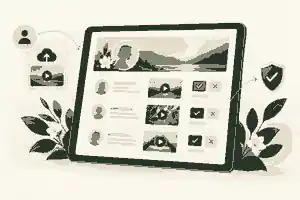
How do contributors upload videos to a memorial page? Guestbooks, messages and moderation starts with one organiser setting the page permissions, inviting trusted contributors, reviewing each video before it appears, and keeping privacy, consent, accessibility and preservation decisions clear from the beginning. In practice, how do contributors upload videos to a memorial page works best when the memorial is treated as a calm family space rather than an open file drop: people are invited, they add a short video memory or message, the organiser checks it, and the approved contribution becomes part of the guestbook, memory wall or tribute area.
This article explains how do contributors upload videos to a memorial page: guestbooks, memory walls and moderation in plain terms for families in Australia, the United Kingdom and the United States. The technical upload is usually simple; the important work is deciding who may contribute, what kind of videos are welcome, how sensitive material is handled, how copyright and privacy risks are reduced, and how the family keeps a copy for the future.
how do contributors upload videos to a memorial page: practical guidance
A contributor video is usually a short personal memory, condolence, story, voice-and-photo clip, service message, reading, song introduction or recorded tribute from someone who knew the person. It may sit beside written condolences in a guestbook, appear on a memory wall with photographs, or be added to a media gallery. The strongest memorial pages keep these contributions purposeful: a two-minute story about a shared moment often has more value than a long unedited phone recording that only a few people will watch.
Families often begin with written messages and later add richer media. Evaheld Memorials already explains how guests leave messages on memorial pages, and the same emotional principle applies to video: the invitation should make guests feel guided, not tested. People need to know whether the family wants a condolence, a funny memory, a short story, a reading, a clip from a family archive, or a message for a later anniversary.
Video also changes the privacy level of a memorial. A written condolence usually identifies the writer and the person being remembered. A video can reveal faces, voices, children, homes, workplaces, health details, addresses, school uniforms, location clues and other living people. In Australia, the OAIC explains that personal information can include photographs, voiceprints and location information, so families should treat video as a higher-sensitivity contribution even when the person being remembered has died.
In the UK, the ICO notes that the UK GDPR applies to living individuals and that information about deceased individuals is not personal data under the UK GDPR, but this does not make every memorial video automatically suitable for sharing. The clip may still identify living relatives, medical staff, friends, children or mourners. In the United States, privacy law varies by state and sector, so the safest family practice is consistent across all three markets: ask before sharing living people prominently, avoid sensitive locations, and keep private material out of public memorial areas.
The upload journey contributors actually follow
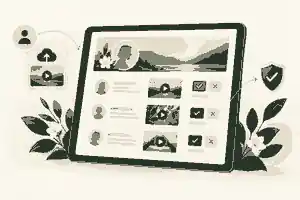
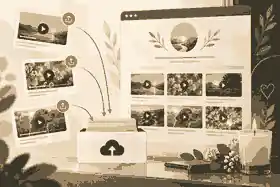
Most contributor upload journeys have six stages. First, the organiser creates or updates the memorial and chooses whether media contributions are enabled. Secondly, the organiser decides who can contribute: anyone with the link, invited relatives only, or named collaborators. Thirdly, the organiser sends a respectful invitation with the memorial link, the kind of video requested, a suggested length and a deadline if the videos are needed for a service. Fourthly, the contributor records or selects a video, checks that it is suitable, and uploads it from a phone, tablet or computer. Fifthly, the organiser reviews the video before it appears. Finally, approved videos are arranged in a guestbook, memory wall, gallery or tribute section.
For families still setting the memorial foundation, creating an online memorial step by step should come before asking dozens of people for media. The first version should establish the tone, spelling of names, life dates, privacy setting and basic story. Once that foundation feels right, video invitations become easier because contributors can see the style and emotional pace of the page.
A good invitation is specific without being controlling. For example: “We are gathering short video memories for Mum’s memorial page. If you would like to contribute, please record one memory, reading or message of up to two minutes. Please avoid private medical details and check with anyone else who appears in the clip before sending it.” That kind of wording reduces awkward submissions and helps guests who are unsure what to say.
Some contributors will not be confident with technology, especially during grief. The family can reduce friction by accepting ordinary smartphone clips, avoiding complicated editing requirements, and asking one practical person to help relatives who need support. how family and friends can help build the memorial matters because video collection is rarely a solo task; it often works best when one organiser reviews content and one or two trusted helpers gently chase missing contributions.
Guestbooks, memory walls and video messages are related but not identical
A guestbook is usually message-led. It collects condolences, names, relationships and written memories in a way that resembles a paper book at a service. A memory wall is usually more visual and can combine posts, photographs, videos and small reactions. A tribute gallery is more curated, often holding selected images, clips and recordings chosen by the family. The same video may fit more than one format, but the organiser should decide where it belongs so the memorial does not feel scattered.
The competitor landscape often blurs these terms. Some platforms call everything a guestbook; others call the same experience a memorial wall, tribute board or digital condolence book. For families, the practical question is not the label but the workflow: can people contribute easily, can the family review submissions, can sensitive entries be removed, can the page stay private if needed, and can memories be preserved later?
Evaheld Memorials guidance on how tributes and condolences work is useful because video contributions should not replace written tributes. Many guests express themselves more clearly in writing, especially if they are upset, shy, time-poor or worried about appearing on camera. A healthy memorial gives people more than one way to contribute.
Profile-style memorials show why format matters. The memorial for Robin Williams demonstrates how a life can be remembered through story, photographs and tribute prompts rather than one single block of text. The memorial for Alan Rickman shows how performance, craft and voice can shape remembrance. The memorial for Olivia Newton-John is a reminder that music, public memory and personal affection often overlap, which is exactly why video and audio need careful presentation.
Moderation should happen before publication
Moderation is not about censoring grief. It is about protecting the family, contributors and the person being remembered. The best setting for video uploads is review-before-publication, especially when the link has been shared widely in funeral notices, social posts or service programmes. Pre-publication review lets the organiser check whether the video is relevant, respectful, technically viewable, lawful enough to share, and aligned with the family’s privacy decisions.
Evaheld Memorials has separate guidance on how to moderate online memorial comments, and the same principles become more important with video. A moderator should watch the whole clip, confirm who appears in it, check whether the tone is appropriate, decide whether captions or context are needed, and reject or hold any clip that includes harassment, graphic distress, private disputes, medical details, unsafe locations, or commercial music that may cause rights issues.
In Australia, the eSafety Commissioner’s advice on unwanted or unsafe contact is relevant because memorial pages can occasionally attract unwelcome messages, impersonation, harassment or attempts to distress the family. Moderation gives families a quiet safeguard: the upsetting material does not need to appear publicly before someone can act.
Moderation also has a pacing function. Grief can make concentration harder, and the National Institute on Aging notes in its guidance on coping with grief and loss that bereaved people may struggle with sleep, appetite, concentration and decisions. A memorial page should not force the closest family members to process a flood of unfiltered video in one sitting. It is reasonable to review contributions in batches, delegate review to a trusted relative, or pause new uploads after the service.
Privacy settings before the first invitation
Privacy should be decided before invitations go out, not after dozens of videos have arrived. A public memorial can be appropriate when the person had a wide community, public role or many distant contacts. A private memorial may be better when the family wants a controlled space, when children appear, when there are safety concerns, when the death was sudden or traumatic, or when family relationships are complex. A semi-private approach, where the page is shared by link with known contacts, often suits video guestbooks because it allows participation without broad public discovery.
The choice between private versus public online memorials affects the kind of videos that are suitable. A clip that is right for a private family circle may be too intimate for a public page. A service reading may be fine publicly, while a bedroom recording from a grandchild, a hospital bedside memory or a clip showing a private home may need restricted access.
US readers should also think about online tracking and account privacy. The FTC explains how websites and apps collect and use information, which is a useful reminder that families should choose memorial platforms with clear privacy settings, avoid oversharing identifying details in invitations, and limit contributor access to people who genuinely need it.
Account security matters because memorial pages can become emotionally and historically important family records. The Australian Signals Directorate’s cyber guidance on passphrases supports a simple rule: the organiser account should use a strong, unique login, not a shared family password passed around by text message. If more than one person needs to help, use contributor or collaborator permissions rather than giving everyone the main account credentials.
Video quality, file limits and practical formats
Contributors do not need to produce polished films. The most useful technical instruction is usually: record in a quiet place, hold the phone steady, face a light source, keep the video short, speak clearly, and avoid background music unless it is original or licensed. Common phone video formats are usually easier to handle than unusual exports from editing apps. If the video is very long, ask the contributor to trim it to the part that matters.
Families planning many uploads should read file limits for digital tributes before asking everyone for long clips. File size limits are not just a platform issue. Large untrimmed videos can be harder to upload on mobile data, harder for older relatives to play, harder to moderate, and harder to preserve. A memorial page usually benefits from several short, meaningful videos rather than one crowded archive of everything available.
A practical family standard might be: one to two minutes for a personal message, three to five minutes for a reading or prepared tribute, and longer recordings only when they are service footage, an interview or a major family archive item. Naming files clearly also helps: “Aunty-May-garden-memory-2026.mp4” is more useful than “IMG_4829.mov”. If a contributor sends the wrong file or wants to revise a message, save your progress and come back later is the kind of workflow families should look for.
Accessibility makes video contributions kinder
Captions and transcripts are not a technical luxury. They help people who are deaf or hard of hearing, older relatives, guests watching without sound, people using translation tools, and anyone who finds audio hard to process while grieving. The W3C’s guidance on captions for audio and video explains why captions provide spoken words and important sounds in text form, while its guidance on media transcripts shows how text alternatives can make audio and video easier to understand, search and preserve.
For a memorial page, accessibility can be simple. Add a short caption such as “Margaret’s brother David remembering Sunday lunches, recorded in Perth, 2026.” If the video includes a reading, paste the words below it. If the recording is hard to hear, write a short summary. If the speaker uses family nicknames, explain them. These small additions turn a video from a file into a memory that future visitors can understand.
Consent, copyright and music choices
Consent does not need to become formal or intimidating, but it should be considered. If a video shows children, people in distress, people who did not know they were being recorded, private interiors, hospital rooms, residential care settings or workplace scenes, pause before publishing. If the clip belongs to someone else, ask permission. If the video was recorded for a private family chat, do not assume it belongs on a memorial page.
Music needs particular care. A favourite commercial song may feel central to the person’s life, but uploading it publicly can create copyright problems. The US Copyright Office’s digital copyright FAQ is a useful reminder that online copying and distribution still matter in digital spaces. UK, Australian and US copyright laws differ in detail, but the practical family advice is similar: use original recordings, licensed music, royalty-cleared tracks, or describe the song in words rather than uploading a commercial track without permission.
Scams and impersonation can also affect bereaved families. The ACCC warns that scams can target personal details and money, and the FTC’s guidance on recognising phishing scams is relevant when families receive unexpected upload links, fake charity messages or suspicious requests connected to a memorial. A safe upload invitation should come from a known organiser and should not ask contributors for unnecessary financial or identity details.
Preserving video memories after the service
A memorial page may be live and editable, but families should still keep their own organised copy of important videos. The Library of Congress’ personal archiving guidance encourages people to actively manage digital files, and its personal digital archiving advice supports the basic practice of selecting, organising, copying and checking important files over time. Its preservation guidance on care, handling and storage of audio visual materials also reinforces that audiovisual memories need deliberate care if they are to remain usable.
Evaheld Memorials’ article on how memorial content can be downloaded later helps families think beyond the first service week. Keep an export of final tribute videos, save original files separately, store captions or transcripts with the video, and record who contributed each clip. If the family later prints a memory book, creates a tribute video, shares a QR-linked memorial, or prepares an anniversary gathering, the archive will be easier to use.
How to decide what belongs on the page
A good video contribution policy is short and humane. It might say: “Please share one respectful video memory, reading or message. Keep it under two minutes if possible. Please do not include private medical details, conflict, graphic material, children without parent or guardian approval, or copyrighted music unless you have permission. The family will review videos before they appear.” This gives contributors confidence and gives moderators a fair basis for decisions.
Families should also plan for edge cases. If someone submits a beautiful but too-long video, ask whether a shorter version can be used. If a clip includes a person who objects, remove or replace it. If two relatives disagree about tone, keep the memorial closer to factual remembrance until a decision can be made. If a contribution is loving but technically poor, summarise it in text or pair it with a transcript. If a video is private but valuable, keep it in the family archive rather than publishing it.
The most authoritative answer is therefore practical rather than purely technical: contributors upload videos to a memorial page through an invitation and upload flow, but the family’s real responsibility is to set boundaries, review submissions, protect living people, keep the page accessible, and preserve the final memories. Evaheld Memorials can help families plan how do contributors upload videos to a memorial page with the right balance of guestbooks, messages and moderation.
adding videos and music thoughtfully is ultimately about restraint. A calm memorial page does not need every file the family owns. It needs the right memories, from the right people, shared at the right privacy level, with enough context that future visitors can understand why they mattered.

Frequently asked questions
How do contributors upload videos to a memorial page? Guestbooks, messages and moderation
Contributors usually upload videos through an invitation link or contributor access set by the organiser, then the family reviews the video before it appears. For richer media choices, adding videos and music thoughtfully should be planned alongside privacy and consent, and the W3C captions guidance explains why video memories are easier to share when captions are considered.
Should video messages appear instantly or wait for approval?
For most families, video messages should wait for approval because video can include private details, other people and distressing moments. Evaheld Memorials’ advice on how to moderate online memorial comments fits video review as well, and the eSafety Commissioner’s unwanted contact guidance shows why moderation can protect bereaved families.
What video length works best for a memorial guestbook?
Short clips usually work best: one to two minutes for a memory, and a little longer for a reading or prepared tribute. Families should check file limits for digital tributes before asking for many uploads, while the Library of Congress personal digital archiving guidance supports keeping organised copies of important files.
Can guests upload videos from a phone?
Yes, phone videos are usually the easiest contributor format when the platform supports uploads and the organiser has enabled contributor access. The process is smoother when families understand how family and friends can help build the memorial, and the FTC phishing guidance is a useful reminder to use trusted invitation links.
What should contributors say in a memorial video?
A contributor can share one specific memory, a condolence, a reading, a short story, or a message of thanks to the person being remembered. Written and video contributions can sit together because how tributes and condolences work is about giving guests more than one respectful way to contribute, and the National Institute on Aging grief guidance explains why people may need time and support when expressing grief.
Should a memorial video include music?
Music can be meaningful, but families should avoid uploading commercial tracks unless they have permission or a suitable licence. Evaheld Memorials covers adding videos and music thoughtfully, and the US Copyright Office digital copyright FAQ is a helpful reminder that online sharing can still raise copyright issues.
How private should contributor videos be?
Contributor videos should match the sensitivity of the content: public for general tributes, private or link-only for intimate family clips, and unpublished for anything too personal. The choice between private versus public online memorials should be made before invitations go out, and the ICO personal data guidance is relevant when living people appear in videos.
Do memorial videos need captions or transcripts?
Captions or transcripts are strongly recommended because they help older relatives, people with hearing loss and anyone watching without sound. If the family is planning how memorial content can be downloaded later, transcripts also make the archive easier to understand, and the W3C transcript guidance explains the accessibility value of text alternatives.
Can contributors edit or replace a video after uploading?
That depends on the platform and permissions, but families should expect some contributors to revise a message once they have had more time. A workflow that lets organisers save your progress and come back later is useful, and the Australian passphrase guidance supports keeping organiser access secure while edits are made.
How should families keep a copy of uploaded memorial videos?
Families should keep an export or backup of approved videos, original files, captions and contributor names in a clearly organised folder. That backup supports how memorial content can be downloaded later, and the Library of Congress advice on care and storage of audio visual materials reinforces that audiovisual memories need ongoing care.