What is online legacy storage? Privacy, access and family planning
A practical guide to online legacy storage for Australian, UK and US families, covering privacy, trusted access, digital assets, memories and memorial planning.
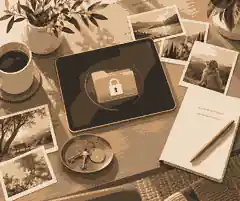
Online legacy storage is the organised, privacy-aware storage of the digital information a family may need after incapacity or death, including account records, important documents, device notes, photo archives, memorial wishes and trusted-access instructions. The point is not to expose every password to everyone; it is to make online legacy storage clear enough that the right person can find the right thing at the right time while protecting privacy, access and family planning.
Most families now hold part of a life in email, cloud drives, phones, social media, subscription accounts, online banking records, scanned documents and shared albums. Some of those things are practical, such as utility accounts, insurance correspondence and estate papers. Others are deeply personal, such as voice notes, photographs, videos, messages and unfinished writing. A good plan separates these categories so that legal and household administration does not collide with remembrance. For family memory work, Evaheld Memorials already explains digital memories and social media guidance, but online legacy storage adds another layer: who may access what, what must remain private, and what should eventually become part of a memorial.
The strongest online legacy storage plan has five parts: an inventory, instructions, permissions, safeguards and review. The inventory says what exists. Instructions explain what should happen. Permissions identify who is trusted. Safeguards prevent premature or unauthorised access. Review keeps the plan current as accounts, devices, laws and family roles change. This is why Google Inactive Account Manager and Apple Legacy Contact are useful but incomplete: they help with specific ecosystems, while a family plan must cover the whole picture.
What online legacy storage should include
Begin with account categories rather than a raw password list. Include email accounts, cloud storage, phones, laptops, tablets, password managers, social media, photo libraries, domain names, websites, subscription services, digital wallets, online banking portals, superannuation or pension portals, insurance accounts, tax records, medical portals, funeral or memorial notes and household accounts. For each item, record the provider, the account holder, the username or identifying email, why it matters, who should deal with it, and whether the instruction is to preserve, transfer, download, close, delete or leave untouched.
Do not store unnecessary secrets where a simple pointer will do. A family member may need to know that important estate correspondence is in a named email account, but that does not automatically mean they should receive full access before death. A spouse may need access to household bills, while an executor may need information about asset records, and a sibling may only need access to family photos. This tiered approach reflects the same privacy thinking behind private versus public online memorials: access should match purpose, not convenience.
Digital memories deserve their own treatment. A photo archive, funeral slideshow, home video folder or scanned letter collection is not the same as a banking portal. The Library of Congress personal digital archiving advice is useful because it frames preservation as active care, not passive storage. Families should identify irreplaceable files, keep more than one copy, add captions, use clear folder names and record context while people still remember it. If a photograph matters because it shows a grandfather in his workshop, the caption and story may become as important as the file itself.
Physical archives still matter. Printed photographs, letters, certificates, notebooks and funeral booklets may be scanned into online legacy storage, but the originals should be handled carefully. The Library of Congress photograph care guidance explains why photographs need careful handling, storage and environmental protection. A practical family workflow is to scan or photograph fragile items first, name files clearly, keep originals in a stable place, then decide which copies can be shared in a memorial and which should remain in a private family archive.
Privacy and trusted access
Privacy is the part of online legacy storage that families most often underestimate. A storage folder can include account information, identity documents, financial records, private messages, health information, photographs of children, location details and sensitive family history. The United Kingdom’s ICO data protection principles are written for organisations, but the ideas still help families think clearly: use information fairly, keep it accurate, limit it to its purpose, protect it and avoid keeping more than is needed.
Australia, the United Kingdom and the United States all treat privacy, estates and access differently, so online legacy storage should avoid pretending there is one universal legal rule. In Australia, wills, enduring powers of attorney and estate administration are state or territory matters, and consumer safety guidance often comes from national bodies. In the United Kingdom, wills and lasting powers of attorney have their own formal rules. In the United States, estates are governed by state law and many digital access questions depend on account terms and local legislation. In all three markets, a sensible plan records wishes but does not replace legal advice.
Trusted access should be assigned by role. A digital executor or technically capable relative may help locate and close accounts, but the legal executor remains governed by the will and relevant law. A surviving partner may need practical household access. A memorial organiser may need photos, stories and service details. A family historian may need archive copies but not financial portals. The Evaheld Memorials discussion of who controls an online memorial over time is relevant here because control is not only emotional; it is operational, and it should be clear before several people start editing, downloading or sharing material.
Passwords require special caution. The United Kingdom’s National Cyber Security Centre password manager guidance supports using a password manager to reduce insecure reuse, while the Australian Cyber Security Centre explains why strong passphrases are easier to remember and harder to guess. A good family plan does not put a printed list of live passwords in an obvious place. It records where the password manager, access key, recovery document or sealed instruction can be found, and who is allowed to use it.
Two-factor authentication must also be planned. Many accounts now depend on a phone, authenticator app, hardware key or recovery email. If the trusted person has a username and password but cannot receive the second factor, the plan may fail. Record recovery dependencies without exposing everything at once: which device receives codes, where backup codes are stored, whether an authenticator app is used, and who may access the device after death or incapacity. Avoid asking relatives to bypass terms of service or impersonate the account holder.
Family planning and memorial decisions
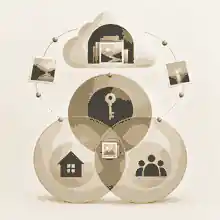
Online legacy storage works best when families separate administration from remembrance. Administration includes documents, accounts, subscriptions, bills, insurance, passwords, device access and platform closure. Remembrance includes photographs, stories, voice recordings, messages, eulogies, videos, recipes, playlists and tributes. Some items belong in both places. A funeral livestream file may be a memory and a practical record. A phone may contain both tax documents and cherished voice notes. Separating these streams reduces conflict and makes it easier to decide what belongs on a memorial.
Evaheld Memorials guidance on meaningful online memorial inclusions is useful because it encourages families to start with identity, story, selected photographs and tributes rather than uploading everything. A private archive can hold the full collection; the public or invited memorial can hold the pieces the family agrees are appropriate. This protects living people, prevents oversharing and gives relatives time to review sensitive material before it becomes searchable, downloadable or widely circulated.
When planning ahead for yourself, write instructions in plain language. Avoid vague statements such as “sort out my online accounts”. Instead, say which accounts matter, what should be preserved, what should be closed, which photographs may be shared, which messages are private, who may manage the memorial, and where legal documents are stored. The GOV.UK will guidance and Australia’s Moneysmart wills information both reinforce a basic point: important wishes need formal planning, and informal notes should sit beside, not replace, proper legal documents.
If incapacity is part of the concern, distinguish after-death access from lifetime decision-making. A person may want someone to help if they become unable to manage affairs before death. In the United Kingdom, the lasting power of attorney process is the formal route for appointing decision-makers. Australia and the United States use different terminology and state-based rules. Online legacy storage can record where documents are and what the person prefers, but families should confirm the legal position in their own jurisdiction.
Family conversations are often more important than the technology. A storage system cannot resolve uncertainty if no one knows it exists. Tell the relevant people that there is a plan, who is responsible, where instructions are kept and when they may be used. You do not need to reveal every private detail during life. You do need to remove the risk that relatives discover the plan too late, cannot unlock the device, or disagree about who was meant to make decisions.
Published memorial profiles show how different kinds of lives leave different digital and cultural traces. The public memory of Amy Winehouse includes music, photographs, interviews and tributes that require sensitivity because artistic legacy and private life can be intertwined. The remembrance of Virgil Abloh shows how creative work, digital design culture and public influence can outlive a person across many platforms. The long career of Olivia de Havilland reminds families that archives are not only recent files; they may include decades of photographs, correspondence, clippings and recorded memories.
Security, scams and common mistakes
Security matters because death and incapacity can create openings for fraud. Criminals may exploit public announcements, fake memorial pages, donation links, account recovery gaps or family confusion. The ACCC scams guidance warns that scammers deceive people to steal money or personal details, while the FTC phishing guidance explains how emails and texts can trick people into revealing passwords or financial information. A family plan should include trusted contacts, verified donation links and a rule that no one shares codes or passwords in response to unexpected messages.
Another mistake is assuming cloud storage equals permanence. Platforms close, subscriptions lapse, file formats change, accounts are deleted and relatives lose access. Families should know how to download memorial content and keep backups of irreplaceable material outside any single service. A stable plan uses a working copy, a backup copy and a separate trusted copy, with a short note explaining what each folder contains and who maintains it.
It is equally risky to assume a memorial website, social media profile and private family vault all do the same job. A memorial website is for selected remembrance and participation. Social media may preserve public interaction but is governed by platform rules. A private vault or storage folder may contain sensitive instructions and files that should never be published. Families comparing these tools can use Evaheld Memorials’ article on what happens if a memorial site ever shuts down to think about backups, exports and provider continuity before a crisis forces the issue.
Identity theft recovery also differs by country. In the United States, IdentityTheft.gov provides an official recovery pathway. In Australia, scam reports and identity support may involve Scamwatch, banks, IDCARE and relevant government agencies. In the United Kingdom, families may need to contact banks, credit reference agencies, Action Fraud and service providers depending on the issue. Online legacy storage cannot stop every risk, but it can reduce confusion by recording which accounts exist, who should contact providers and which documents may be needed.
A practical online legacy storage workflow
Start with a one-page map. List the main places your digital life lives: phone, laptop, email, cloud storage, password manager, social accounts, photo libraries, financial portals, legal documents and memorial wishes. Do not try to perfect the system immediately. A clear first draft is better than an elaborate plan no one finishes. Then add a short instruction beside each category: preserve, close, transfer, download, delete, review privately or ask a named person.
Next, decide who should know what. Choose one trusted person for the existence and location of the plan, one person for practical household access if needed, one person for memorial or archive decisions, and one legal adviser or executor contact where appropriate. These may be the same person, but they do not have to be. If relatives will help gather memories, Evaheld Memorials explains how family and friends can be invited to help build the memorial, which is useful once the private storage work has identified what can safely be shared.
Then create a document set. Include a digital asset inventory, device list, password manager location, recovery instructions, legal document locations, photo archive map, memorial wishes, social media preferences, subscription list and review date. Store it somewhere protected. Avoid sending the full document by ordinary email. If a printed copy exists, keep it sealed or stored with other important papers. If a digital copy exists, protect it with strong access controls and make sure a trusted person knows how to find it when the time comes.
Finally, review the plan at predictable moments: after changing phones, moving house, opening or closing major accounts, changing relationships, making a new will, appointing a new attorney or executor, or after a major health diagnosis. Online legacy storage is not a once-only task. It is a maintenance habit. The review can be brief: are the accounts current, are trusted people still right, are passwords handled safely, are backups working, and are memorial wishes still accurate?
How Evaheld Memorials fits beside private vault planning
Evaheld Memorials is for remembrance, tribute and family contribution, not for publishing private account instructions or replacing legal planning. The distinction matters. Sensitive records, access keys, financial details and private messages belong in secure private storage or with formal advisers. Selected stories, photographs, tributes, service details and memories may belong in a memorial once the family has agreed what is appropriate. If you are beginning from scratch, creating an online memorial step by step can sit after the private storage decisions, not before them.
The simplest approach is to use online legacy storage as the private planning layer and Evaheld Memorials as the chosen remembrance layer. The private layer says where things are, who can access them and what should happen. The remembrance layer tells the person’s story and gives family and friends somewhere respectful to contribute. Before starting the memorial, the FAQ on what information helps you start a memorial can help families turn stored details into a calm first draft.
As the memorial grows, families can choose whether to invite contributions, keep the memorial private for a while, moderate messages or open it more widely. The FAQ on how people can leave tributes and condolences on a memorial is especially relevant because online legacy storage should not only preserve files; it should help the family decide how memories are received, reviewed and kept over time.
If your family wants a respectful place for selected memories after the private planning layer is clear, Evaheld Memorials can help you begin online legacy storage conversations through a memorial space that keeps remembrance separate from sensitive account access.

FAQs
What is online legacy storage? Privacy, access and family planning
Online legacy storage is a protected way to organise digital accounts, documents, memories and instructions so trusted people can act later without unnecessary exposure. It should sit beside digital memories and social media guidance and be shaped by official preservation advice such as the Library of Congress personal digital archiving guidance.
Should online legacy storage include passwords?
It may record where passwords or access keys are securely held, but it should not scatter live passwords through ordinary documents or emails. Families comparing privacy choices can use private versus public online memorials alongside the National Cyber Security Centre password manager guidance.
Who should be trusted with digital legacy access?
Choose people by role: legal executor, household helper, archive organiser, memorial steward or technical support person. The Evaheld Memorials article on who controls an online memorial over time pairs well with the formal decision-making context in the GOV.UK lasting power of attorney process.
How do families keep digital memories safe long term?
Keep more than one copy, use clear file names, add captions and store a separate backup away from the main device or account. Evaheld Memorials explains how to download memorial content, while the US National Archives family archives advice supports organised preservation.
What happens if the storage service or memorial website closes?
No platform should be treated as the only copy of irreplaceable memories or instructions. Families should understand what happens if a memorial site ever shuts down and apply broader preservation thinking from the Library of Congress photograph care guidance.
What should be shared publicly and what should stay private?
Public memorial content should usually be selected, consent-aware and emotionally appropriate, while account access, legal documents and sensitive messages stay private. Evaheld Memorials outlines meaningful online memorial inclusions, and the ICO data protection principles offer a useful privacy mindset.
When should a family create a memorial from stored material?
Create the memorial after the family has separated private records from shareable photographs, stories and service details. Evaheld Memorials explains creating an online memorial step by step, while Apple Legacy Contact shows why platform-specific access planning should happen before a crisis.
What information is needed before starting a memorial?
Start with the person’s name, key dates, a short life summary, selected photos, privacy preference and one person responsible for early edits. Evaheld Memorials lists what information helps you start a memorial, and Google Inactive Account Manager shows why account instructions should be prepared separately.
Can relatives help build the memorial from a family archive?
Yes, but give relatives access only to the material they need and agree on review rules before publishing. Evaheld Memorials explains how family and friends can be invited to help build the memorial, while the ACCC scams guidance is a reminder to verify links and requests before sharing.
Can people leave tributes from the stored memories?
People can leave tributes when the memorial is set up to receive them, but families should still moderate sensitive stories and private details. Evaheld Memorials explains how people can leave tributes and condolences on a memorial, and the FTC phishing guidance supports careful link and message verification.